The Swiss Army knife for indie devs.
Support chat, error tracking, email, feedback, a changelog and feature flags, in one panel you host yourself. Ship as many apps as you like and run them all from the same place, instead of paying for six tools that each know a sixth of your product.
The demo is the real inbox with sample data: no sign-up, nothing saved. Runs on your own machines with docker compose up -d.
AAcmeMaya Chen
Every app, one list
Each app you run is a project, and every project writes into the same inbox — colour-coded, filterable, one unread count. You are not signing in and out of four helpdesks.
No support email, no ticket numbers
Your users are already signed in to your app. Your server signs a short token and they are identified — no new account to make, no “please include your order ID”.
You can see what they were looking at
The chat attaches the page, record or item they were on when they wrote. It is sitting on the conversation before you have asked a single question.
Connecting it is a ten-minute job.
Three steps. Your users never make an account, because they already have one with you — your server vouches for them with a token that lasts an hour.
1Create a project
One project per app. You get a public key
pk_…that’s safe in a browser and a secretsk_…that never leaves your server. Set the name replies are signed with, the origins allowed to host the chat, and who gets emailed when someone writes.2Sign a token for the user who's signed in
One authenticated route on your server. Any JWT library works; here it is with none at all.
import { createHmac } from 'node:crypto' // GET /api/support/token — only for a signed-in user of your app export function mintSupportToken(user) { const b64 = v => Buffer.from(JSON.stringify(v)).toString('base64url') const now = Math.floor(Date.now() / 1000) const head = b64({ alg: 'HS256', typ: 'JWT' }) const body = b64({ iss: process.env.HELP_BITES_PROJECT_KEY, sub: user.id, name: user.name, email: user.email, iat: now, exp: now + 3600 }) const sig = createHmac('sha256', process.env.HELP_BITES_SECRET).update(head + '.' + body).digest('base64url') return head + '.' + body + '.' + sig }3Drop the chat on the page
A script tag and the function that fetches that token. That's the install.
<script src="/widget.js" data-project="pk_…" defer></script>
<script>
  window.HelpBites = window.HelpBites || []
  HelpBites.push(['init', {
    getToken: () => fetch('/api/support/token').then(r => r.json()).then(r => r.token),
    context: { type: 'page', id: location.pathname, label: document.title, url: location.href } // optional
  }])
</script>
Only the origins you listed can host it — anywhere else sees an error and never gets a token. Add
data-mode="inline"with a target element and the same chat becomes a page of your app instead of a floating bubble.
The tour
Six tools’ worth of work, in one panel.
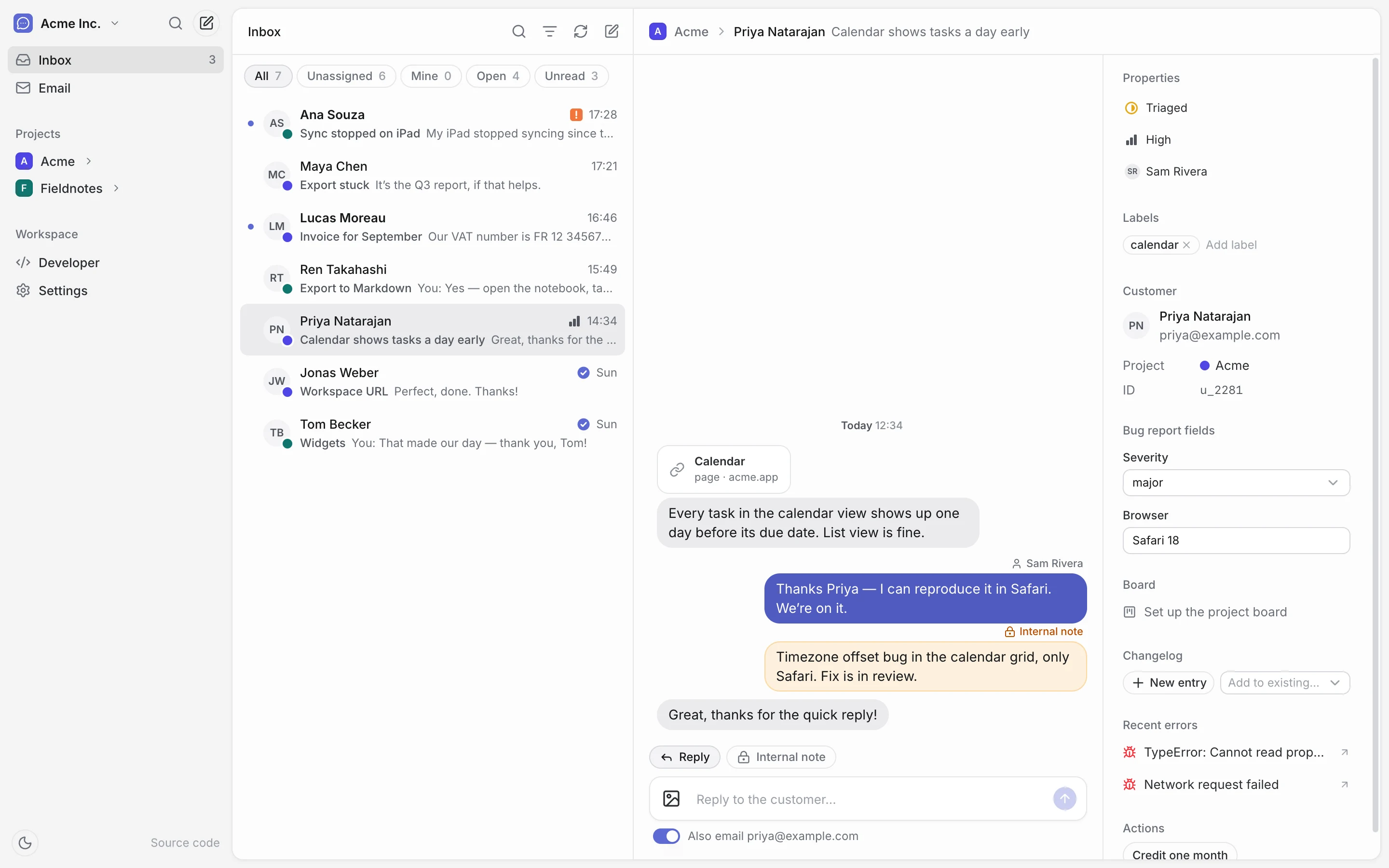
Inbox
Every app, one conversation list.
Reply as the team, leave notes the customer never sees, and see who they are and what broke for them without leaving the thread.
- Colour-coded projects, one unread count, live updates
- Assign, prioritise, label and close, with custom fields per ticket type
- Their recent errors and linked planning items sit beside the chat
- Replies also go out by email when they are away
Errors
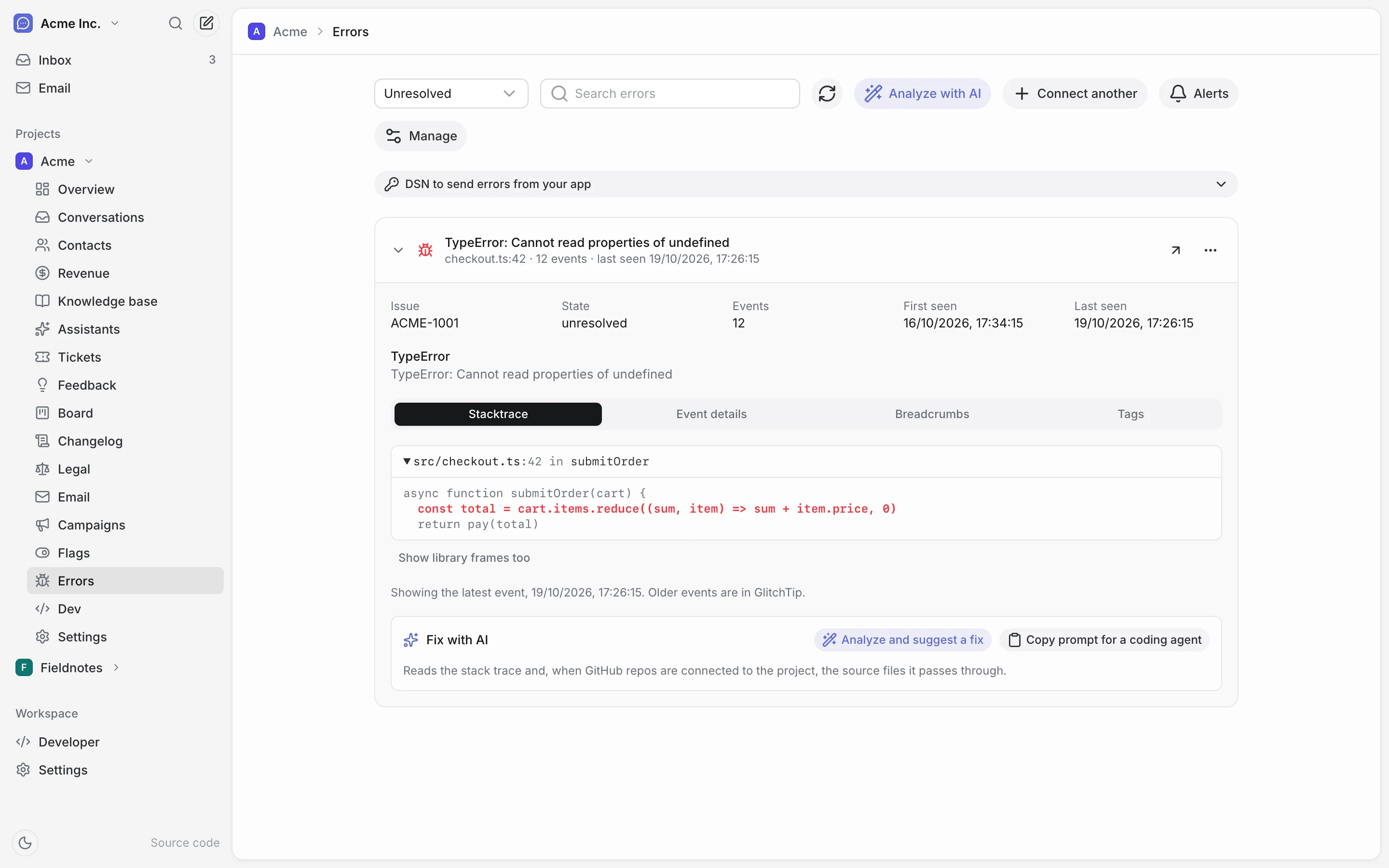
Errors, with the fix attached.
Connect GlitchTip or Bugsink and browse every issue with its stack trace, breadcrumbs and tags. Errors stay out of the inbox.
- AI reads the stack trace and your GitHub repos, then suggests a fix
- Or copy the same context as a prompt for your coding agent
- Alert rules by email or Telegram: new error, total events, or N in a window
Feedback & roadmap
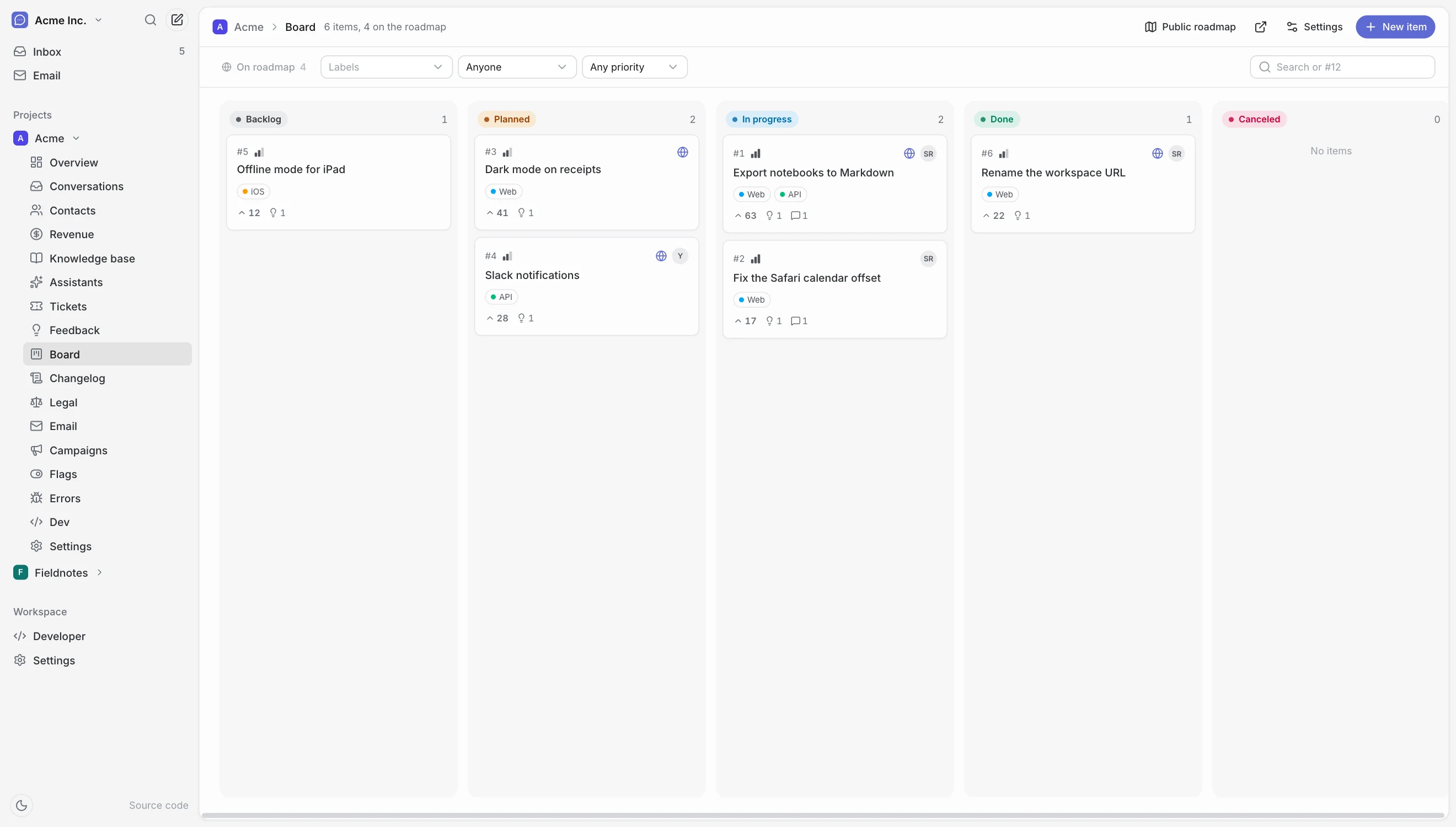
Users say what to build. You decide what ships.
A public feedback page per project, and a private planning board behind it. Votes from linked posts add up on each card.
- Votes, comments, reactions and @mentions, with duplicates merged
- Link cards to feedback posts and inbox conversations
- Publish only the items you pick as a public roadmap
- Moving a card updates its linked posts, and emails their followers
Changelog
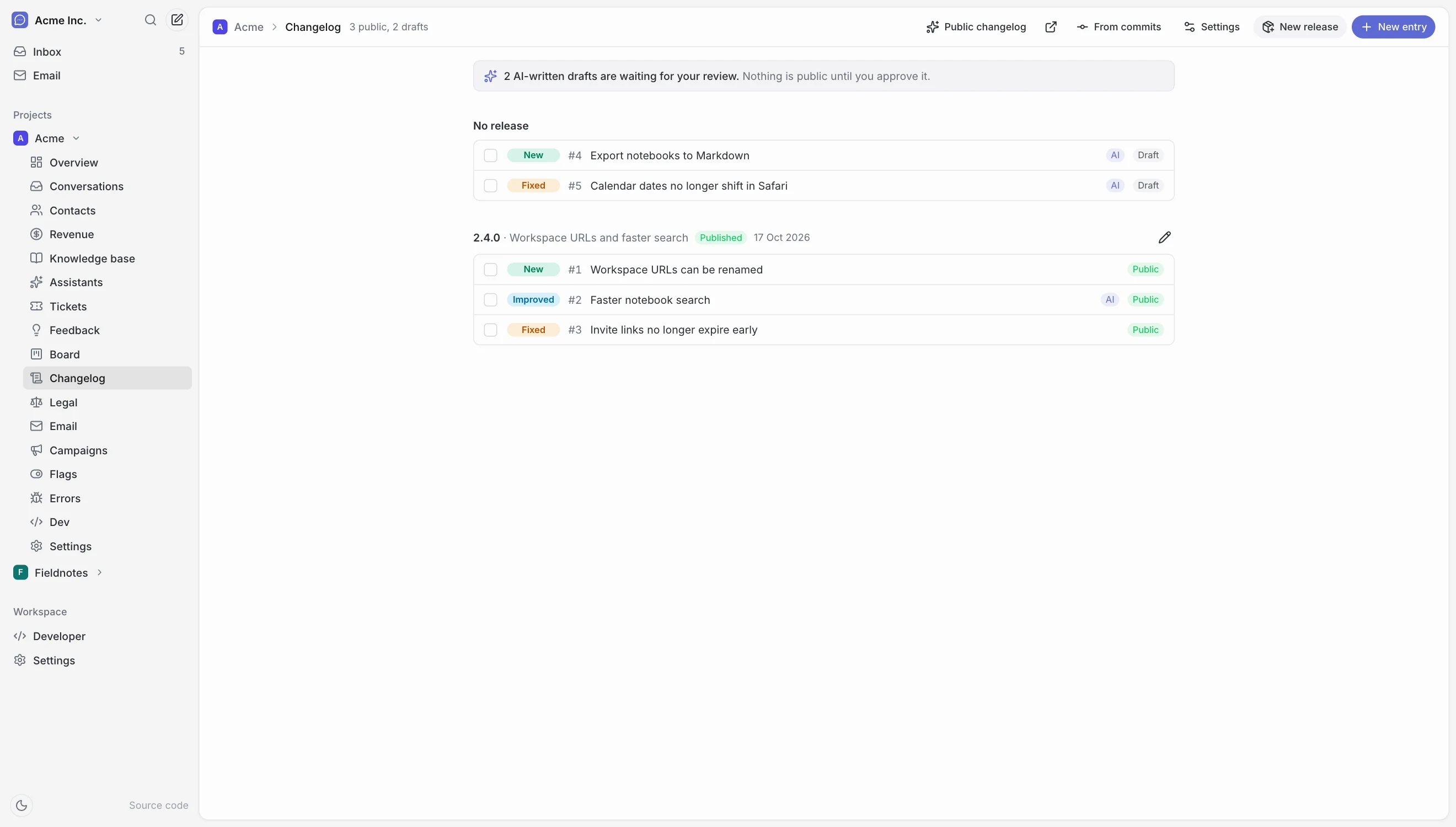
A changelog that writes its first draft.
Entries are drafted by AI from your GitHub commits or finished work, and wait for your review. Nothing is public until you approve it. When one ships, the people who asked for it hear about it.
- Group entries into versioned releases
- A public page, JSON and RSS, plus digest emails for readers
- Or write entries yourself, or from the command line
Design once. Brand it per project.
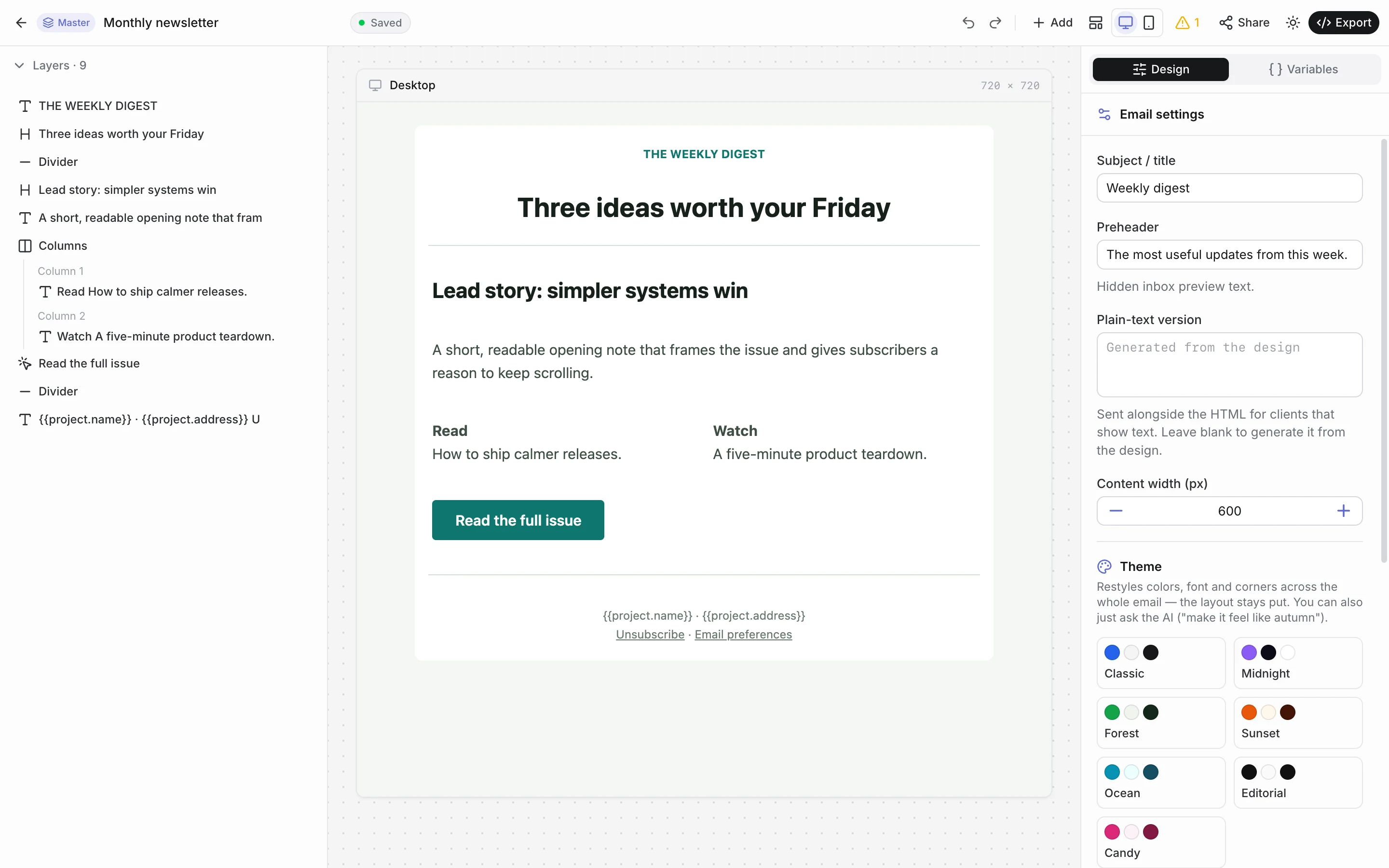
A block designer that renders for Gmail, Apple Mail and Outlook, with an AI that turns pasted HTML into editable blocks.
- One shared template linked into every project, each with its own brand
- Checks for missing alt text, low contrast and placeholder links
- Send from your server with one API call, scheduled or per recipient
- Reusable components, share links, test sends, import and export
Delivery
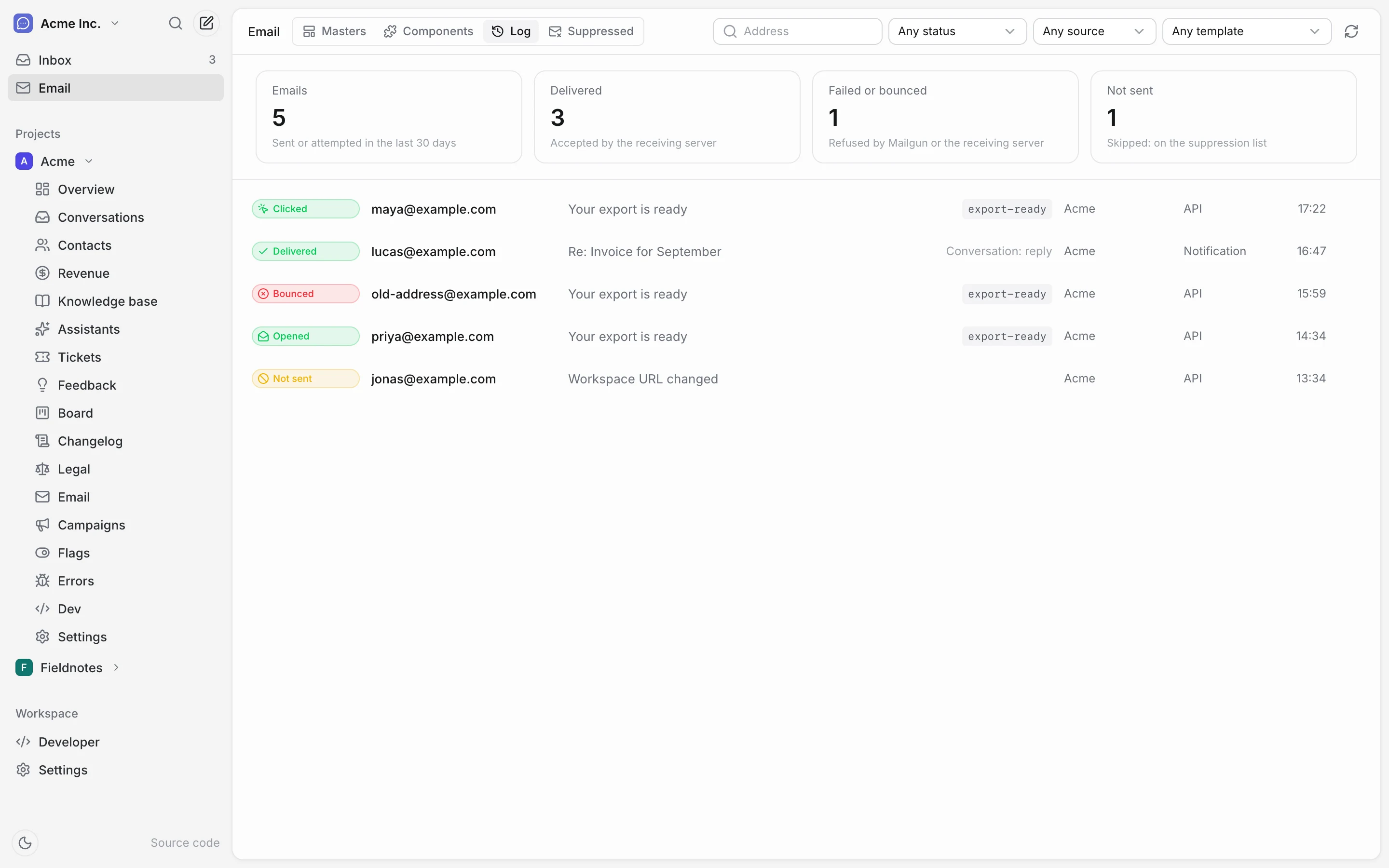
See every email that left, and what happened to it.
One entry per recipient, kept current by Mailgun. Bounces, complaints and unsubscribes are suppressed so you stop sending to them.
- Opened, clicked, bounced and skipped, filterable by template or source
- Contacts, segments, broadcasts and drip sequences with double opt-in
- Unsubscribe links and one-click headers by default
Flags
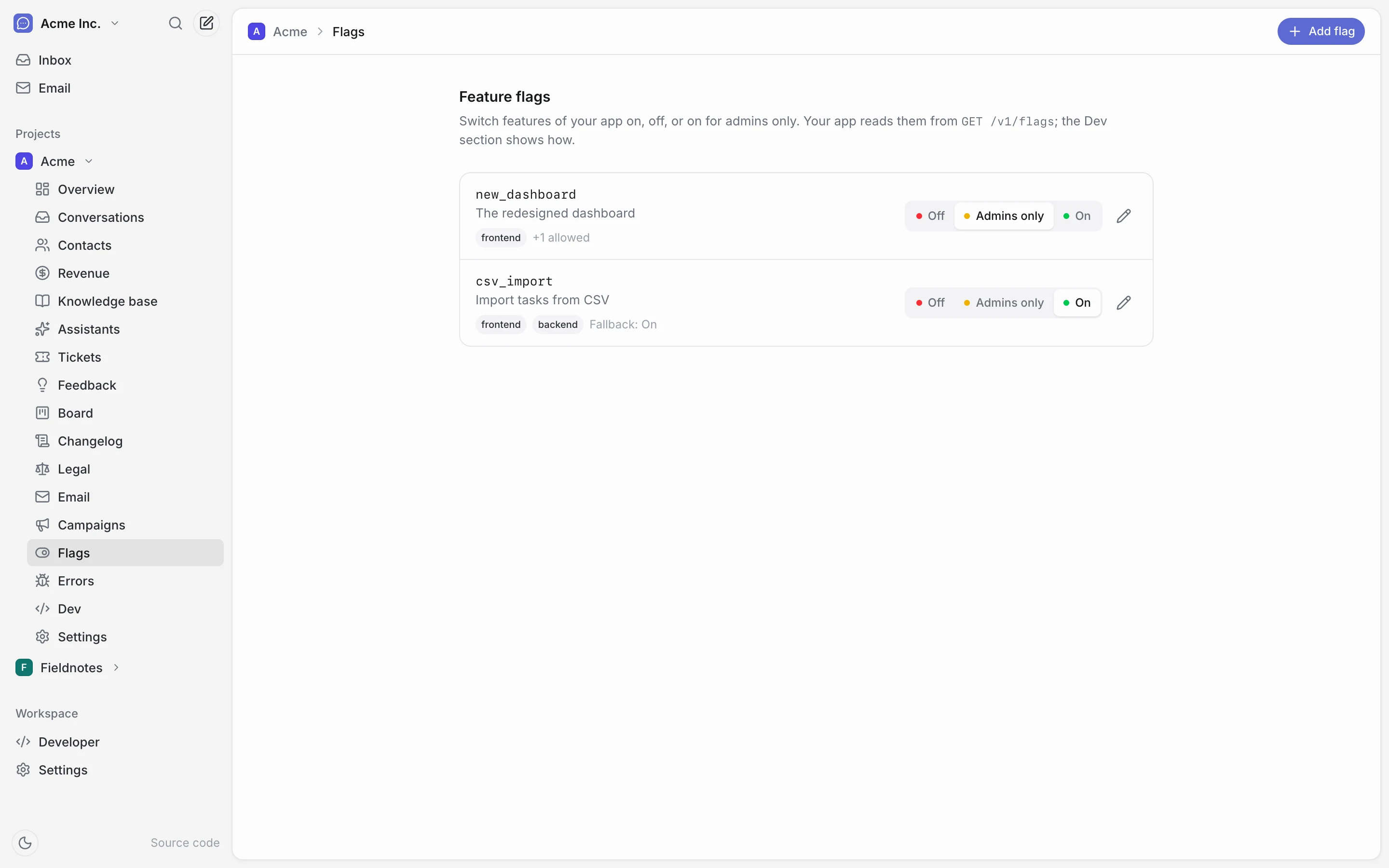
Switch a feature without a deploy.
Off, on, or on for admins only, with an allow list. Your app reads them over the API, with a fallback for when we are unreachable.
- Tag flags for frontend, backend or iOS
- Your server reads the lot; a browser reads its own evaluated values
And more
Small things that sit next to support.
Revenue from Stripe
Connect a read-only key to see revenue, subscribers and each person’s payments next to their conversations.
Legal documents
Draft a privacy policy, terms, cookie and refund policy from reviewed clauses, then host them on a public page. A starting point for your lawyer, not legal advice.
Bring your own AI
OpenAI, Anthropic, Gemini, OpenRouter, Mistral, Groq, xAI, DeepSeek or any OpenAI-compatible endpoint. Off until you switch it on.
Telegram alerts
Send a project’s error alerts to a Telegram chat as well as email. HelpBites only sends.
Knowledge base
Upload an FAQ and let an assistant answer from it, with routing rules that hand the rest to a person.
iPhone, iPad and Mac
A native app for the inbox, the email editor and most of the panel, with push notifications.
Every feature
The full list.
In your app
One script tag, no dependencies, about 10 KB.
- A bubble, or a page of your app
- Give it a container and data-mode="inline" and the same chat becomes a page in your layout.
- Knows what they were looking at
- Attach the page, record or link they are on, and update it as they move around your app.
- Onboarding that always loads
- Write welcome screens in the panel and show them once with one script tag or a SwiftUI file, in your users' languages. Your app keeps a copy, so they still show when HelpBites is unreachable.
- Pricing that Stripe keeps right
- Plan cards, a paywall or a comparison table on your site and in your SwiftUI app. Prices and checkout come from Stripe; the names, features and buttons are yours, in your users’ languages and currencies. A/B test them and see which one sells more.
- Images, reactions, read receipts
- Paste or pick PNG, JPEG, GIF or WebP. Reply, unsend and react, and see when the team has read it.
- Your colours
- Your Brand kit sets the accent, logo, typefaces and corner radius once. The chat, boards, forms, legal and blog pages and campaign mail all wear them.
- One tag, one public page
- helpbites.js adds the chat, feedback board, changelog and onboarding your project has. A page at /hub gathers your changelog, roadmap, feedback, blog and legal documents, and the chat can open on a Home tab with what is new.
- Or none of it
- Every endpoint is public and documented. Build your own chat UI on /v1/* instead.
In your inbox
One panel, however many apps and teammates.
- Every app, one live list
- Colour-coded projects, one unread count, and messages that arrive as they happen. Filter by assignee, status or unread.
- Every app at a glance
- The panel opens on an overview: a card per app with its unread and open conversations and revenue, one list of what needs attention (drafts to approve, failed syncs, bounces, fired alerts), the latest unread messages, and revenue by app. Each app has a setup checklist that turns green only when things really connect.
- Notes, context and errors
- Internal notes your customer never sees. Their recent errors and linked planning items sit beside the conversation.
- The customer, beside the chat
- Their plan and MRR from Stripe, their earlier conversations and the feedback they asked for, which they follow. Reply from saved replies and FAQs, or have AI draft an answer from your knowledge for you to edit.
- Email when you are away
- Notify whoever you list per project. Replies go to users by email too, linking straight back to the thread.
- Write first
- Start a conversation with a user, after a failed payment or before a migration.
- iPhone, iPad and Mac
- A native app for the inbox, replies and most of the panel, with push notifications once your server has APNs set up.
Feedback, roadmap, changelog and blog
Users tell you what to build. You tell them what shipped.
- A public feedback page
- Users post ideas and bugs, vote, comment and react. You set the types, tags and statuses, and merge duplicates.
- A roadmap from your own planning
- Plan internal work on a kanban, link it to posts and conversations, and publish only the items you pick. File an error on it in one click, and see the GitHub commits and pull requests that finished each item.
- A changelog from what shipped
- Entries grouped into releases, drafted from finished work and reviewed before they go public. Includes RSS and digest emails.
- A blog with a newsletter
- Write posts and pages in a rich editor and publish them on a hosted blog in your own design, in your own site or by RSS, and email them to your subscribers. An AI writing helper drafts or improves posts from your GitHub repos. Members-only posts, SEO fields, a sitemap and an import from Ghost. Readers react and comment.
- Followers get the news
- Email when a followed post changes status, gets a public reply, or mentions them. Anyone can mute or unfollow.
Knowledge and AI assistants
Off until you turn it on. Grounded in your docs when it is on.
- Upload your FAQ
- A Markdown or text file becomes a searchable knowledge base. Duplicates are flagged, and re-imports never overwrite your edits.
- Assistants answer from it
- Each one has its own instructions, your choice of OpenAI, Anthropic, Gemini and others (or any compatible endpoint), and routing rules that send a conversation to AI or to a person. Test a question first and see why it answers or hands over.
- You choose what it sees
- Assign knowledge per assistant, by area or by single FAQ, with exclusions. Test retrieval before it answers anyone.
- Hybrid search
- Keyword and vector search over the knowledge base. It runs keyword-only if you skip embeddings.
Email and marketing
Design once, brand per project, send from your server, see every delivery.
- A block email designer
- Sections, buttons, columns and reusable components, rendered for Gmail, Apple Mail and Outlook. An AI designer turns pasted HTML into blocks.
- A send API
- POST a template, your own HTML or a block document, with per-recipient variables and language, attachments, scheduling and idempotency keys.
- A log of every delivery
- One entry per recipient, kept current by Mailgun. Bounces, complaints and unsubscribes are suppressed automatically.
- Contacts, segments and campaigns
- Sync people from Postgres, Parse or Firestore, segment them, then run broadcasts and drip sequences with double opt-in.
- Waitlists and lead forms
- Collect people before you launch with a single email box or a form of your own, with file uploads and in your visitors' language, on your site, a hosted page or in your app. Every sign-up becomes a contact with its own segment, double opt-in, a welcome email and a drip sequence.
Your team and your tools
Roles, error tracking and flags that sit next to support.
- Error tracking
- Connect GlitchTip or Bugsink. Browse errors with their stack traces, get alert emails or Telegram messages when one spikes, file one on your board, and fix them with AI that reads your GitHub repos.
- Revenue from Stripe
- Connect a read-only key to see revenue, subscribers and each person’s payments next to their conversations.
- Hosted legal pages
- Draft a privacy policy, terms, cookie and refund policy from reviewed clauses, translate them with AI, then publish them on a page you link to.
- A brand kit to share
- Logos, app icons, screenshots, colours, fonts and guidelines on a public press page in one of three templates, with downloads and an embed for your site.
- Landing pages and a headless CMS
- Build pages from templates and components in a visual editor, with animations, and host them. Or read the same content from your Vue, JavaScript or Swift app. An assistant writes the copy and new components, reading your GitHub repos.
- Feature flags
- Switch features on, off or for admins only, from the panel, without a deploy.
- Your own ticket types
- Support is built in. Add types with their own statuses, fields and actions, and actions call back to your app over a signed webhook.
- Roles for your team
- Agents answer, admins run projects and the team, owners handle billing. Invite people by email. Export a workspace or one project, or move it between self-hosted and cloud in one click.
- Drive it from Claude or ChatGPT
- Connect any MCP assistant with one address. It reads the inbox, replies, triages feedback and writes changelog entries as you, with your role. Revoke it with one click.
A person reads it, and a person answers.
AI is off until you switch it on for an assistant, and when it is on it answers only from the knowledge you gave it. No bot in the way by default, no “did that answer your question?”, no deflection funnel measured in tickets avoided. For most products, a chat window with a human on the other end is the entire feature.
It’s yours to run.
One docker compose up -d brings up the app, Mongo, Parse and Redis. Attachments go to any S3-compatible bucket you point it at. Your users’ conversations stay on infrastructure you control. Nothing phones home; the only outside services are the ones you connect, such as Mailgun or an LLM.
The widget is a convenience, not the product. Everything it does is on the API, and the API is documented down to the response shapes — build your own chat UI on it if you’d rather.
- GET
/v1/conversationsList - POST
/v1/conversationsStart one - GET
/v1/conversations/:id/messagesTranscript - POST
/v1/conversations/:id/messagesSend - DELETE
/v1/messages/:idUnsend - POST
/v1/attachmentsMultipart file - GET
/v1/eventsServer-sent events
Your whole toolkit starts here.
Click around the real panel with sample data, or run it yourself with one command.