Docs/Guides
GitHub connection
A workspace connects its GitHub accounts and organisations once; each project then picks the repos it uses. AI error notes and legal documents can read those repos (the legal wizard's Suggest from my repos reads the file list and dependency manifests; see LEGAL.md). HelpBites only ever reads them: the app asks for read-only access.
In the panel
- Settings → GitHub → Connect GitHub. Install the app on your account or organisation and choose which repos it may see (all, or only some).
- Project → Settings → GitHub repos: pick the repos this project uses (up to 10, from any connected account).
What reads them. AI error notes (ERRORS.md): when an error arrives, HelpBites lists each repo's files at its default branch, matches the stack-trace paths by path suffix (a path must match exactly one file), and reads up to 3 of them (100 KB max each; the prompt gets about 80 lines around the failing line). The text goes to the AI as untrusted data. Nothing is stored, and failures (no repos, GitHub not set up, a repo that is gone) skip silently.
Changelog from commits. Changelog → From commits reads the repos' commit messages (newest 300 per repo, default branch) and has the AI draft changelog entries; see FEEDBACK.md. To draft entries automatically on every push, turn the app's webhook on (below). Only the push's commit messages are used, and they go to the AI as untrusted data.
#12 in commits and pull requests. With the webhook on, what you write on GitHub links back to the
board. A commit pushed to the default branch, or a pull request merged into it, that mentions #12 in its
commit message, pull request title or description, or branch name is shown on that item (the board item's
drawer and the feedback post's editor list Commits and pull requests). A closing keyword right before the
number (close, closes, closed, fix, fixes, fixed, resolve, resolves, resolved) also moves
the board item to the board's first done status: through the same path as dragging the card, so linked
posts follow if the board syncs them, their followers are emailed, and a changelog draft appears if the
project drafts entries for finished work. The move is made as "GitHub". An item that is already done or
canceled is left alone, and nothing is ever moved back.
- Which item
#12means. The board item numbered 12 when the project's board is on and has one, else the feedback post numbered 12, else nothing. Say which in your message by numbering carefully; the board and the feedback board count separately. - What is not a reference. Code spans and fenced blocks, links,
owner/repo#12(an issue in another repository), numbers of six digits or more (colours), and in a commit message the pull request number GitHub itself adds: a squash commit's trailing(#34)andMerge pull request #34 from …. The pull request's own number in its title or description is ignored too. A branch name counts asfix/12-login,feature/42-widget,issue-12,gh-12or#12, never as a closing keyword. - What a keyword closes. Only a keyword directly before the number:
fixes #12, #13closes 12 and merely mentions 13. A keyword before a feedback post's number is recorded (closes) but changes nothing: only board items move. - Stored once. Each commit or pull request is stored once per item (a redelivery changes nothing);
GET /v1/admin/github-refs?project=<id>&kind=board|feedback&id=<item or post>lists them. They are rebuilt from new pushes, not carried by an export or transfer. - Events.
github.commit.referencedfor each new commit link andgithub.pull_request.mergedfor each merged pull request (EVENTS.md).
Changing which repos the app can see happens on GitHub (the app's installation settings); the lists here are read live. Disconnect only forgets the link in HelpBites; uninstall the app on GitHub to revoke access there too. A connection can't be disconnected while a project uses its repos.
Registering the GitHub App (server owner, once)#
Do this once per server, on the GitHub account that should own the app. Replace https://helpbites.app with
your APP_URL everywhere below. It takes about five minutes.
1. Create the app#
GitHub → your avatar → Settings → Developer settings → GitHub Apps → New GitHub App. Give it a name
(it becomes the slug in github.com/apps/<slug>) and fill in:
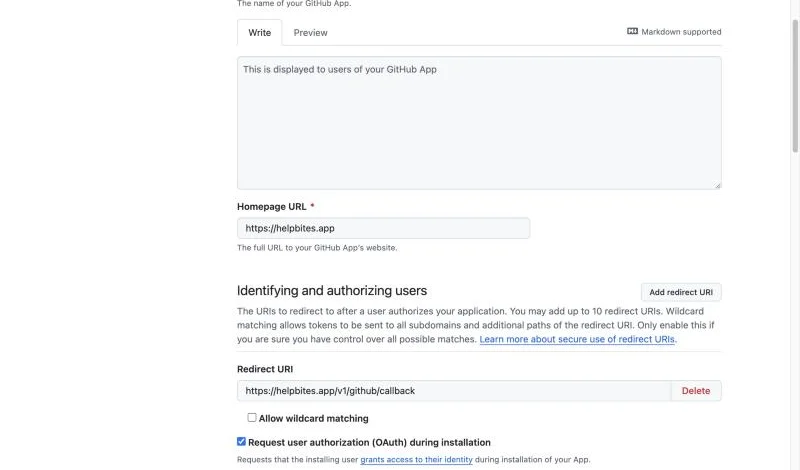
| Field | Value |
|---|---|
| Homepage URL | your APP_URL |
| Callback URL | <APP_URL>/v1/github/callback |
| Request user authorization (OAuth) during installation | tick it |
| Setup URL | greyed out while the box above is ticked; GitHub uses the callback URL instead |
| Enable Device Flow | leave off |
2. Turn the webhook on#
The webhook is optional, but it is what drafts changelog entries from pushes and links #12 in commits and pull
requests to the board. Without it the rest of the connection still works.
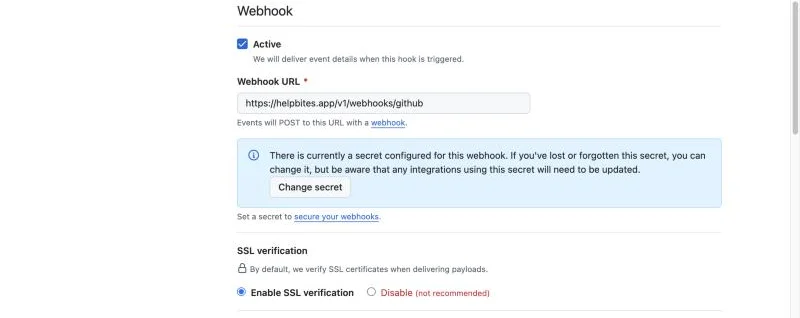
Tick Active, set Webhook URL to <APP_URL>/v1/webhooks/github and invent a Secret (for example
openssl rand -hex 32). Keep it: it becomes GITHUB_APP_WEBHOOK_SECRET. Leave Enable SSL verification on.
3. Give it read-only access#
Open Permissions & events (on the new-app form it is the same section) → Repository permissions and set:

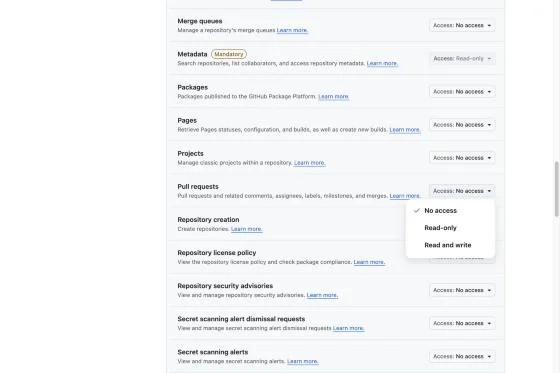
- Contents: Read-only (file lists, dependency manifests, commit messages).
- Pull requests: Read-only. HelpBites never reads pull requests through the API; the permission only exists so GitHub will deliver the pull request event.
- Metadata: Read-only is added for you and cannot be changed.
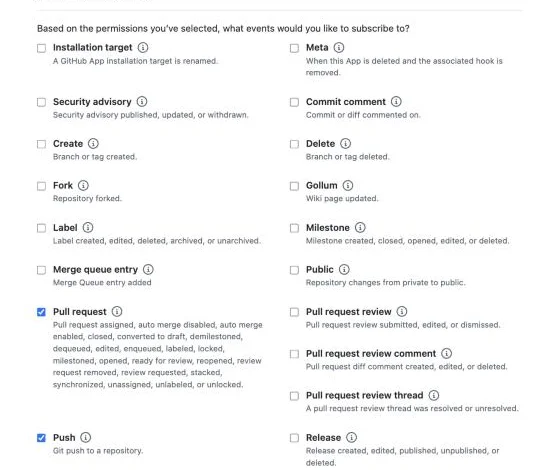
Everything else stays No access. Setting a permission is what reveals the event checkboxes below it. Under Subscribe to events tick Pull request and Push:
4. Who can install it#
At the bottom of the form, Where can this app be installed?: Any account if your users connect their own GitHub (a public service), Only on this account if only you do. Then Create GitHub App (or Save changes on an existing app).
5. Collect the credentials#
On the app's page, copy the App ID and Client ID from the top. Then open Credentials:
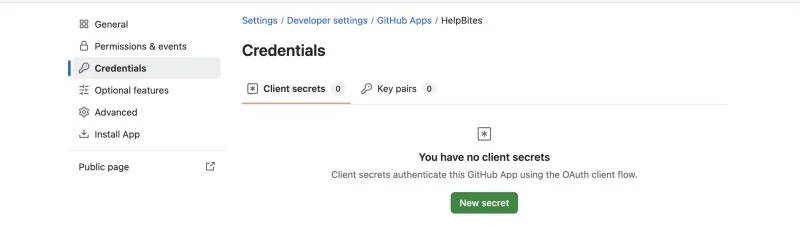
- Client secrets → New secret. GitHub shows it once; copy it now.
- Key pairs → Generate a private key. GitHub downloads a
.pem; keep it private.
6. Set the environment variables#
GITHUB_APP_ID=…            # the App ID
GITHUB_APP_SLUG=…          # the name in github.com/apps/<slug>
GITHUB_APP_CLIENT_ID=…
GITHUB_APP_CLIENT_SECRET=…
GITHUB_APP_PRIVATE_KEY=…   # the .pem; literal \n is accepted
HELPBITES_SECRET=…         # already needed for contacts; signs the install link
GITHUB_APP_WEBHOOK_SECRET=…  # optional: the webhook's Secret; without it pushes are refused (503)
Restart the server. Settings → GitHub now shows Connect GitHub instead of "GitHub isn't set up on this server". Click it, install the app on your account or organisation and pick the repos it may see.
Upgrading an existing app. Merged pull requests need the Pull requests: read-only permission and the Pull request event, which an app registered before this existed does not have. On GitHub open the app's settings (Developer settings → GitHub Apps → your app), add the permission and tick the event; GitHub then asks every account that installed the app to accept the new permission (each owner gets an email and a banner), and the event only arrives for installations that have. Until then nothing breaks: those installations keep working, push events still link commits, and merged pull requests are simply not linked. HelpBites never reads pull requests through the API, so the permission only exists for GitHub to deliver the event.
A project is found from a push by the repo ids saved when its repos were picked. Projects whose repos were picked before this existed need their repos saved once more (Project → Settings → GitHub repos).
Until all of these are set, the GitHub tab says it isn't set up.
How it is kept safe#
- No GitHub credential is stored. Only the installation id and account name are saved in the workspace; short-lived installation tokens are minted from the app's key when needed.
- GitHub returns the browser with an installation id, which anyone could forge in a URL. The OAuth code that comes with it is exchanged and the installation must be on that person's own list, so a workspace can't attach an account it doesn't control. The link back is signed, single-purpose and expires after 15 minutes.
- The webhook is accepted only with a valid
x-hub-signature-256(HMAC-SHA256 of the raw body withGITHUB_APP_WEBHOOK_SECRET), and each delivery id is acted on once. Pushes and merged pull requests count only on a repo's default branch, and only for projects that picked that repo. - A repo is saved only if GitHub lists it for that installation, with GitHub's own name for it.